.htaccess, since it is a feature specific to Apache. The testProtected page mentioned below is no longer functional.Authentication
A file named .htaccess can control many aspects of its enclosing directory, including authentication. In this post, I'll show you how to protect pages with an authentication wall, set up common error pages, and prohibit directory browsing.
.htpasswd file
First, create a file named .htpasswd outside of the web directory to manage which users may view the protected pages. I used this handy generator to create a hashed password (never store passwords in plain text!).
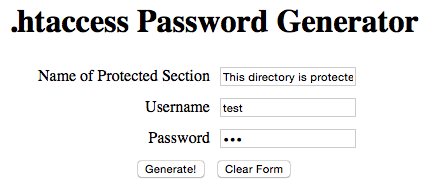
The generator produces an .htpasswd entry and an .htaccess file:
AuthName "This directory is protected"
AuthType Basic
AuthUserFile /SOMEDIR_OUTSIDE_ROOT/.htpasswd
require valid-user
The text after AuthName appears in the password prompt:
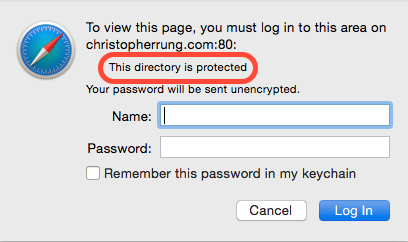
Create the protected directory
$ cd /var/www
$ mkdir testProtected
$ vim testProtected/index.html
Next, create an .htaccess file inside the protected directory and add the four lines from the generator.
$ vim testProtected/.htaccessTest this by visiting http://[your IP]/testProtected and verifying that an authentication wall appears.
I updated my page and .htaccess disappeared!
This happens because Jekyll clears the web directory each time a change is detected. Prevent this by adding a line to _config.yml:
keep_files: [Christopher_Rung-Resume, '.htaccess', testProtected]Note: don't include file extensions for regular files, and hidden files like .htaccess must be enclosed in quotes.
Setup Error Page Redirection
Write an error page and place it in the web directory, then create a .htaccess file with the following line to redirect 404s:
ErrorDocument 404 /404.htmlPrevent Directory Browsing
Without this setting, visitors can browse your server's directory structure — like this:
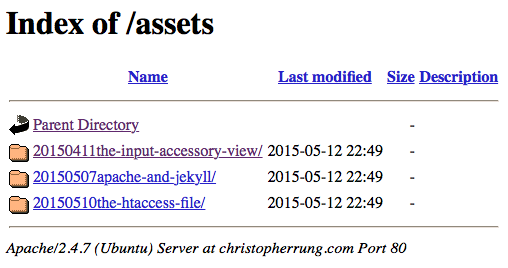
Add the following to your web directory's .htaccess file to prevent this:
Options All -IndexesThanks for following along! Please let me know if you have any questions.